
The scale says how much. The tape says where.
Silueto is where you log your measurements: waist, hips, chest, arms and legs, left and right side apart. Session after session, you see where your shape has changed. Your data stays on your phone, encrypted. No account, no server, no ads.


Free, on iPhone. Android comes later; we’re not promising a date.
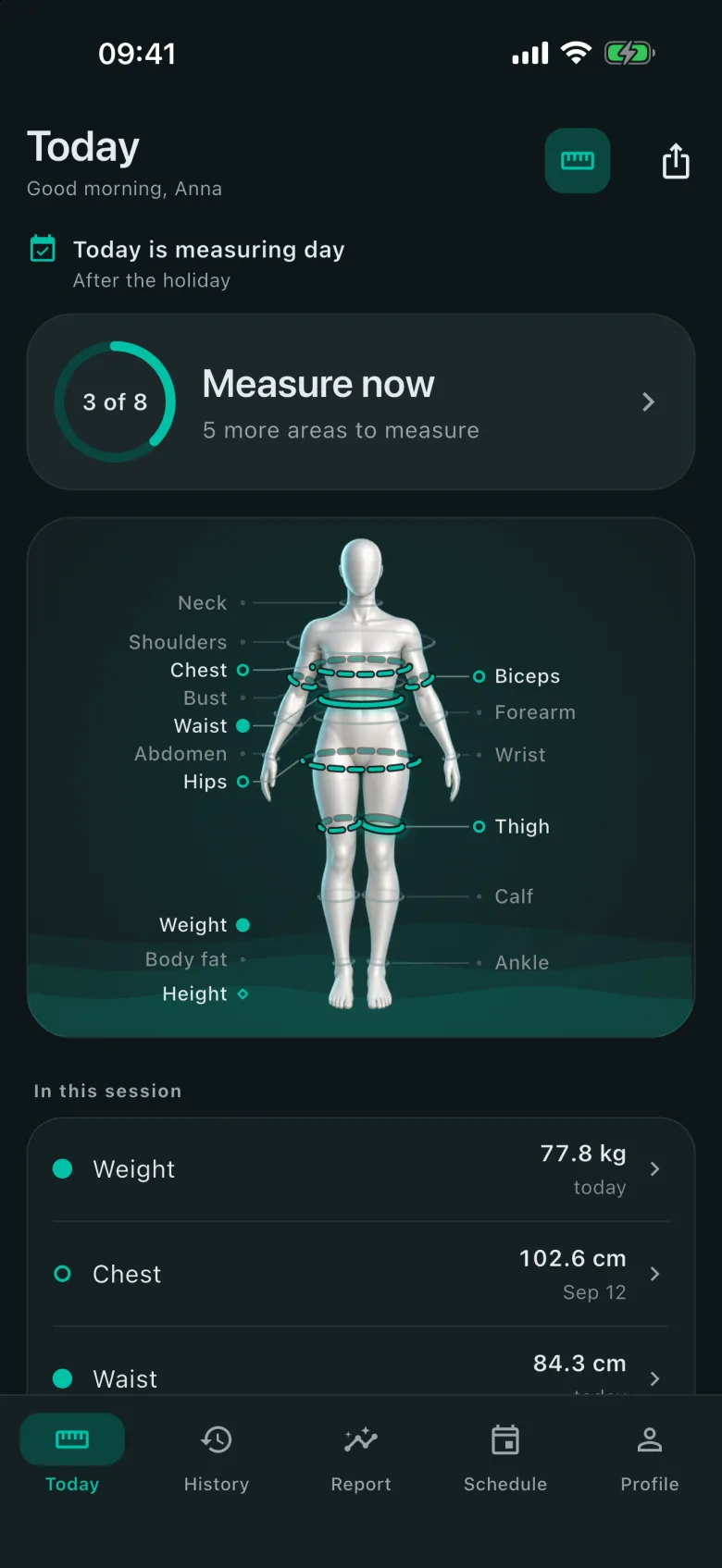
Every area. Left and right, apart.
Sixteen areas, each with a note on where the tape goes. Arms and legs are logged for each side.
Turn on only the areas you care about and put them in the order you measure. If one is missing, name it yourself, say “waist — widest point”, with a target if you like. Circumferences go in centimeters or inches, weight in kilograms or pounds.
“Same time, same position. Tape snug, not tight.”
Torso
- Neck
- Shoulders
- Chest
- Bust
- Abdomen
- Waist
- Hips
Arms
- Biceps left · right
- Forearm left · right
- Wrist left · right
Legs
- Thigh left · right
- Calf left · right
- Ankle left · right
General
- Weight
- Body fat
- Height
One session, then the next.
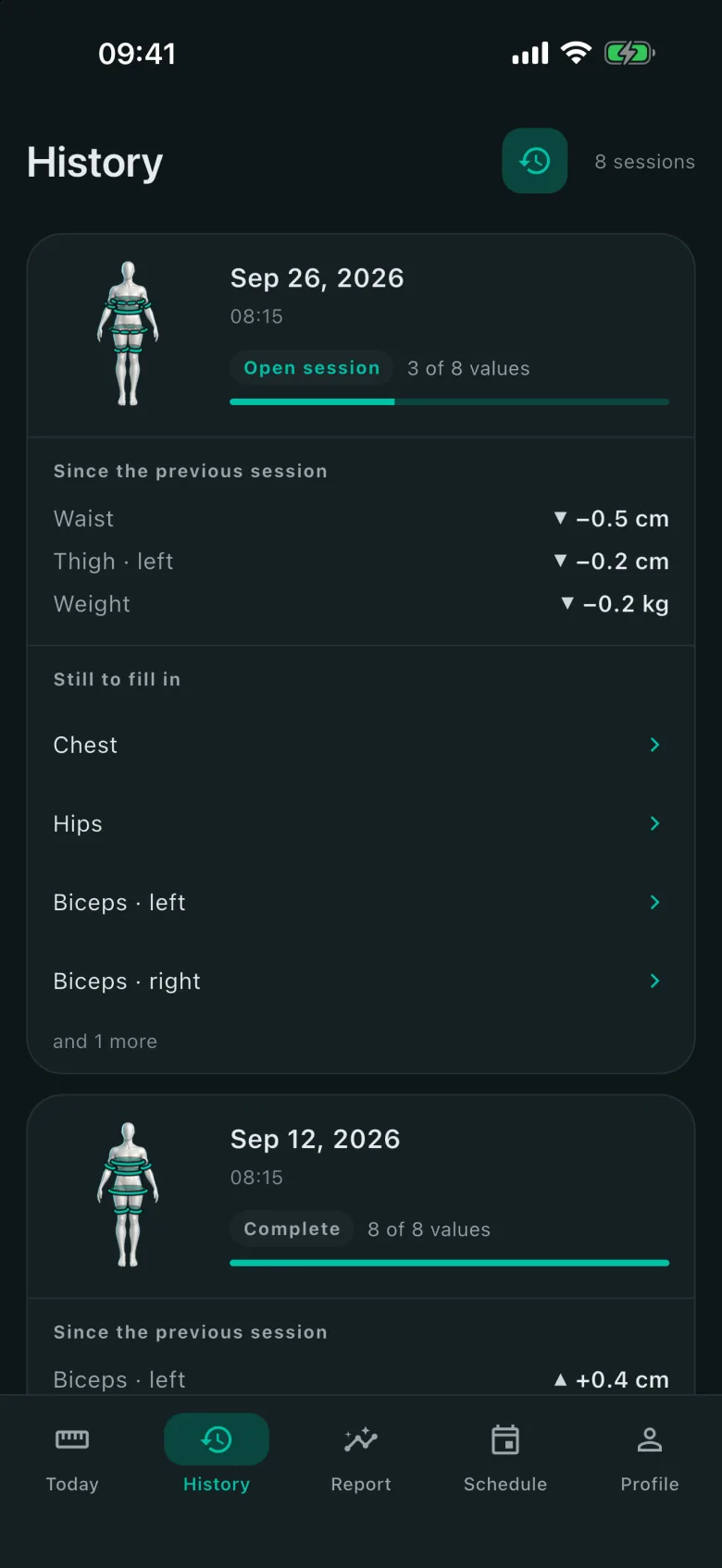
You measure in your own order, and every value is saved the moment you enter it, on this phone only.
A session is complete when every area you chose has a value. The report compares complete sessions only, so a missing value never shows up as a decrease.
Typed a wrong number? Change or delete it in History, and the comparisons update themselves. What you delete stays in “Recently deleted” for 30 days, and you can bring it back from there.
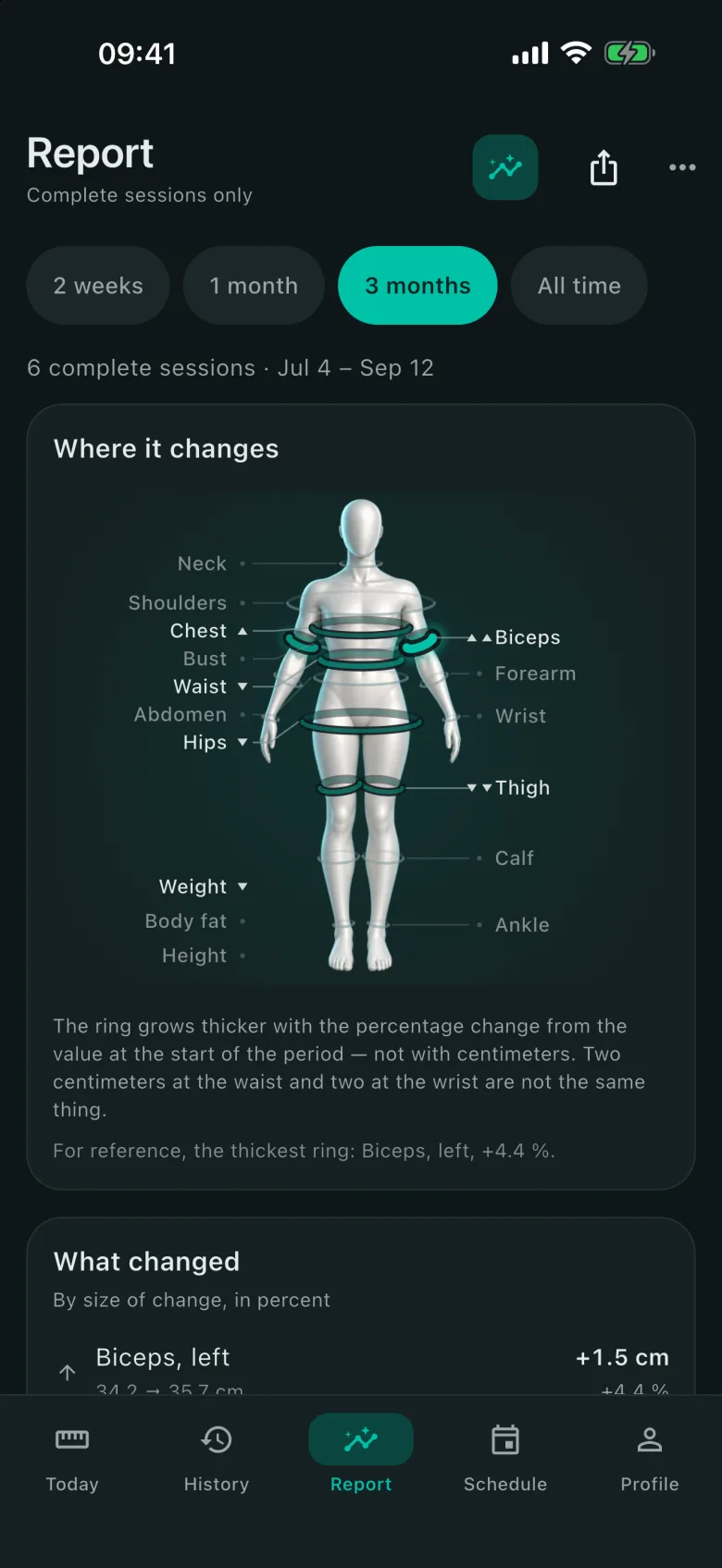
Where your shape changed.
The report puts rings on the figure. The bigger the change, the thicker the ring.
The ring grows thicker with the percentage change from the value at the start of the period — not with centimeters. Two centimeters at the waist and two at the wrist are not the same thing. Body fat is already a percentage, so it counts in percentage points (pts).
No number turns red or green, and no message praises or scolds you. The app shows what changed; what it means is up to you. BMI appears only if you want it: you can hide it in Profile.
What changed
By size of change, in percent
- Waist−3.0 %84.0 → 81.5 cm · down −2.5 cm
- Biceps, right+1.9 %31.2 → 31.8 cm · up +0.6 cm
- Hips−1.6 %101.0 → 99.4 cm · down −1.6 cm
- Thigh, left−0.7 %57.0 → 56.6 cm · down −0.4 cm
An example, not real data. Up and down share one color: the arrow and the sign carry the direction.
Left next to right.
Arms and legs are compared with each other, session by session.
The difference between the two sides, session by session. The middle line is zero — equal sides. Above it, the right side is larger, and a plus in the numbers also means the right.
In History, every area has its own chart: two weeks, three months, a year, or all of it. The line breaks where there was a long pause — we don’t know what happened between those points.
right is larger
left is larger
An example, not real data.
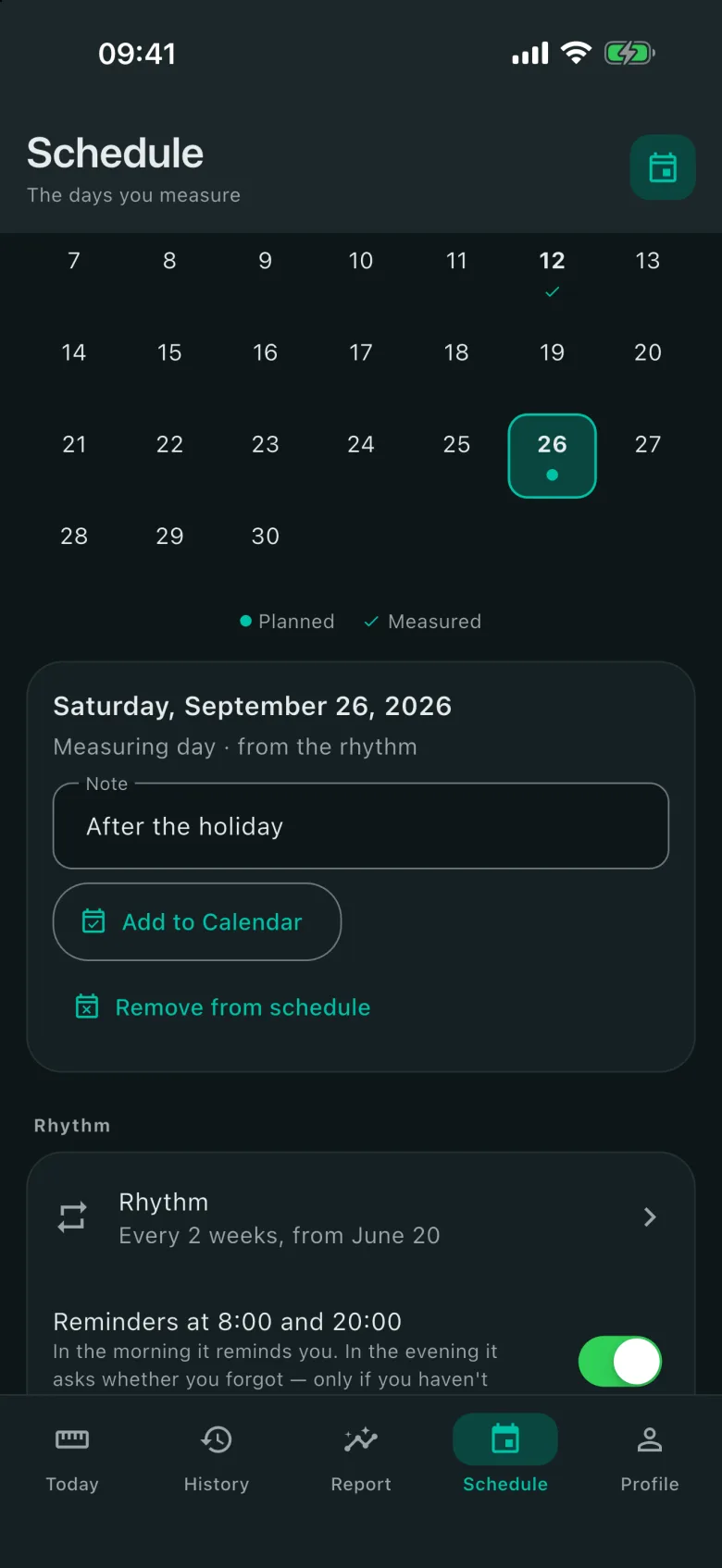
Your measuring days.
In Schedule you pick the days, or a rhythm: every week, or every two, three or four weeks.
In the morning it reminds you. In the evening it asks whether you forgot — only if that day’s session isn’t complete yet. All on the phone, no internet. If the evening comes and you haven’t, the reminder reads something like this:
Silueto 20:00
Forgot about the tape?
The tape measure spent all day in the drawer and is starting to feel ignored.
Up to eight people can measure on one phone, each with their own profile and measurements, kept apart. You can send the report as an image, for Instagram or Viber, or as a file that anyone with Silueto can open.
The trainer’s notebook.
Coming in version 1.1.0, submitted to the App Store and in review.
For personal trainers: your clients and their measurements, on this phone only.
Turn it on in Profile › Trainer › “I’m a trainer”. When it’s off, the app looks as it did before, and your clients stay on the phone until you turn it on again.
Silueto sends nothing anywhere. If you turn sync on, your appointments are written to your phone’s calendar, and the calendar syncs them with your Google or iCloud account.
“Silueto only records the payment: it charges nothing and sends nothing.”
- My clients Each client with their own measurements, kept apart from yours. In Trainer mode the phone holds up to 50 people with measurements.
- Appointments One-off or weekly, by day or by week.
- Attendance One tap, five states: done, no-show, cancelled in time, late cancellation, moved. “Close the day” marks everyone else as done.
- Packages The balance, the expiry, the payments you record, and “Who owes”.
- Assessments An assessment opens the client’s measurements and offers the reassessment in 4 or 6 weeks. Send the client their progress as an image or as a file, with BMI hidden if you like.
- Calendar Send the schedule as an .ics file, or keep appointments up to date in your Google or iCloud calendar. Calendar access is asked only when you turn that on.
- Reminders For appointments, packages and reassessments, scheduled on the phone, with no internet. Notes, phone numbers and measurements never show on the lock screen.
- Message Ready-written, for SMS or WhatsApp. You can change it, and it leaves only when you send it.
- Reports By week or by month, with CSV tables. The notebook goes into your encrypted copy.
The round timer.
Coming in version 1.1.0, submitted to the App Store and in review.
On “Today” you start a workout in rounds: boxing, MMA, Muay Thai, Tabata and more, or your own rounds and rests.
It runs full screen. The presets follow the rules, and you can change them. The signals ring with the phone locked too, over your music.
Finished rounds stay in Schedule if you leave “Keep the rounds in the Schedule” on. Off: the workout is not written anywhere.
Presets
Signals
- Round start Bell · two long buzzes
- Round end Three bells · one long buzz
- Halfway One ding · one short buzz
- Last minute Two dings · two short buzzes
- Last 10 seconds Wooden clapper · three short buzzes
- 10 seconds to the round Double tone · three short buzzes
Each has its own sound and vibration, so you know where you are without looking at the phone.
Nothing leaves your phone.
Your measurements stay on this phone. We don’t ask for an account, and we don’t send anything anywhere.
Your measurements are saved encrypted, with a key only this phone has. No other device can use it — and we don’t have it either. Apart from the measurements you enter, the app analyses nothing on your phone: it doesn’t read your photos, contacts or other apps, and it has no analytics.
No analytics, no ads, no automatic crash reports. Something leaves only when you choose: an exported copy or a report you send to someone, through your phone’s share sheet; the automatic backup, to a folder you pick; measuring days and appointments, to your phone’s calendar.
The part that costs us.
“We can’t give your data back, because we never had it.”
The same choice that makes a leak impossible also makes recovery impossible. If you delete the app, reset your phone or lose it without a copy, your measurements go with it.
That’s why the encrypted export exists. A single .silueto file, encrypted with your password (AES-256). Send it anywhere — Viber, email, a USB stick — and open it with Silueto on your new phone.
Silueto can also make the copy on its own: turn on “Automatic backup” in Profile › My data, and when you leave the app, an encrypted copy goes to a folder you choose, such as iCloud Drive. The app sends nothing: it writes a file into the folder, and the folder is synced by iCloud — or the service you chose — in your account.
Coming in version 1.1.0, submitted to the App Store and in review.
If you forget the password, the copy can’t be opened. There’s no reset: the password isn’t stored anywhere, not even on your phone.
What it doesn’t do.
Said up front, so you don’t find out later.
- It isn’t a medical device and doesn’t diagnose anything.
- It doesn’t give diet or workout advice.
- It has no accounts and keeps no copy of your data on our side.
- It doesn’t sync phones on its own: your data moves with the encrypted copy.
- It doesn’t read your photos, contacts or other apps.
- It doesn’t scan your body with the camera: you measure, with a tape.
The screens.
Who makes it.
Silueto is made by Songurov Fiodor, an independent developer in the Republic of Moldova.
It’s free, with no ads and no subscription. We don’t buy ads, so people only hear about it from those who use it.
A question, a bug you found, an area you’re missing: write to us.